JavaScriptでカンバン機能を実現できるライブラリ「jKanban」の使い方 〜 その(2)
前回のブログ記事では、jKanban ライブラリを使って簡単なカンバンを表示する例をご紹介しました。
今回は、一歩進めて、カラムやカードを装飾する方法を紹介します。
デモンストレーション
今回のデモ用の HTML を用意しました。
https://github.com/bunatree/jkanban-examples/blob/main/example2.html
下図のように、赤、青、緑の 3 つのカラムと 5 枚のカードが表示されます。
こちら↓は CodePen に作成した動くデモです。 https://codepen.io/bunatree/pen/yLoExQr
See the Pen jKanban Example 2 by bunatree (@bunatree) on CodePen.
カンバンのカスタマイズ
今回は、(1) カラムのタイトルに色を付ける、(2) カードの文字に色を付ける、(3) カードの背景色を設定する、(4) カードに画像を表示する、の 4 つのカスタマイズを行います。
カラムのタイトルに色を付ける
前回のブログ記事で紹介したように、各カラムは <header> と <main> で構成されています。
ここでは <header> に表示されるテキスト(つまりはカラムのタイトル)の色を白に、背景を任意の色で染めることにします。
変数 dataContent として定義された JSON データの中から次の箇所を見付けてください。3 つのカラムには class 属性があり、それぞれ red, blue, green という値が設定されています。
{
  "id"    : "column-id-1",
  "title" : "赤",
  "class": "red",
  // 省略
},
{
  "id"    : "column-id-2",
  "title" : "青",
  "class": "blue",
  // 省略
},
{
  "id"    : "column-id-3",
  "title" : "緑",
  "class": "green",
  // 省略
}
これらの class 属性はカラム用に設定するものですから、カラム本体を作っている <div class="kanban-board"> にクラス名として追加されると思いますが、実際は子要素である <header> にクラス名として追加されるので注意が必要です。
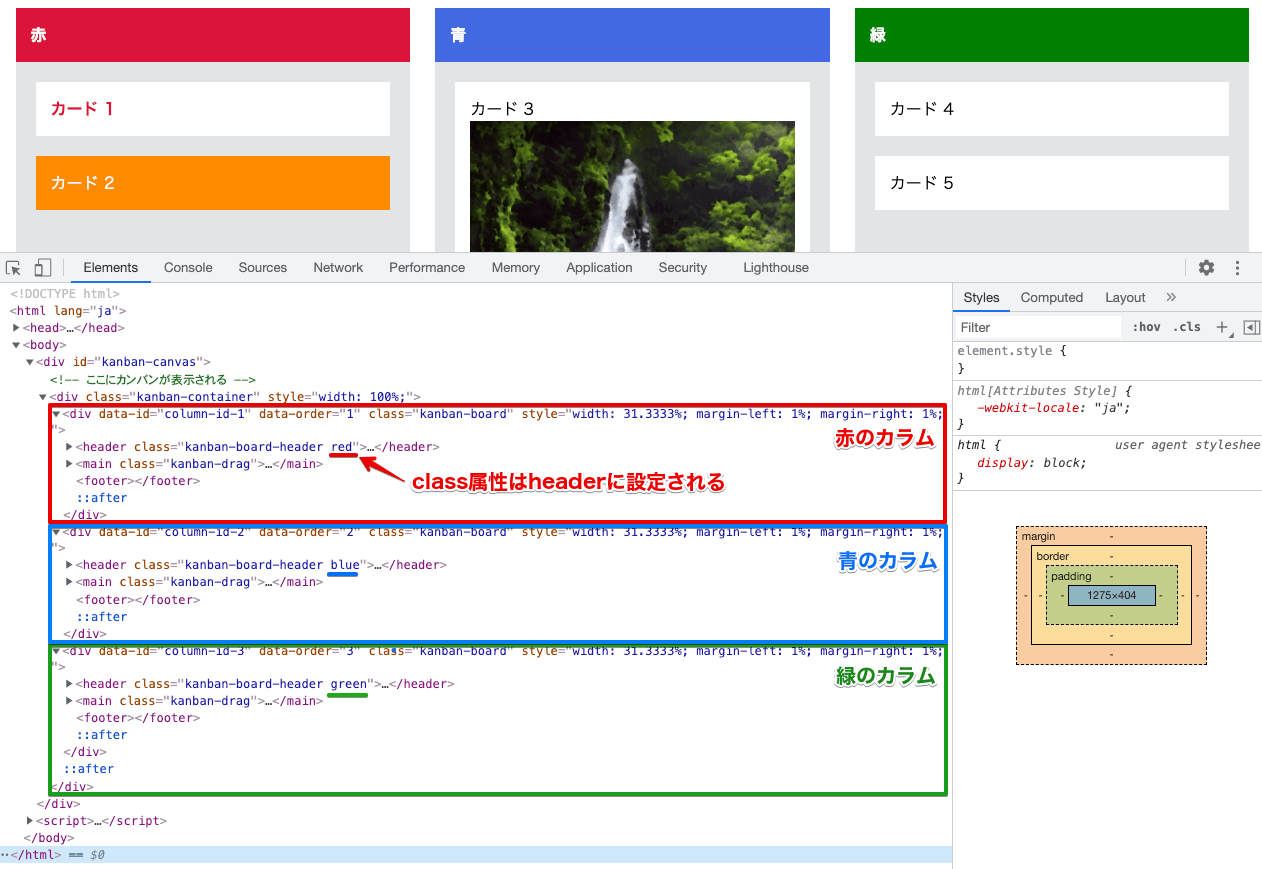
HTML ファイルの <head>. に次の CSS を加え、「.
.kanban-board header {
  color: white;
  background-color: gray;
}
.kanban-board header.red {
  background-color: crimson;
}
.kanban-board header.blue {
  background-color: royalblue;
}
.kanban-board header.green {
  background-color: green;
}
この CSS により、上図のようにカラムのヘッダーのテキストが白くなり、背景色が赤、青、緑になります。
カードの文字に色を付ける
赤いカラムに表示されている「カード 1」のテキストが赤い色で表示されています。
変数 dataContent からこの「カード 1」を定義している部分を見つけると、title 属性の値に HTML で <span class='text-red text-bold'>. が書かれていることがわかります。
{
  "id"      : "item-id-1",
  "title"   : "<span class='text-red text-bold'>カード 1</span>",
  "username": "hoge"
},
このように、title 属性の値にはテキストだけでなく HTML を含めることができます。
そして、CSS で「text-red クラスがあれば赤(クリムゾン色)、text-bold クラスがあれば太字で表示する」という装飾を施します。
.kanban-item .text-red {
  color: crimson;
}
.kanban-item .text-bold {
  font-weight: bold;
}
カードに画像を表示する
上記で title 属性に HTML を入れられることがわかりましたので、それを応用し、今度は <img> タグを使ってカードに画像を挿入してみます。
青いカラムに表示されている「カード 3」を次のように定義します。
{
  "id": "item-id-3",
  "title": "<div class='item-title'>カード 3</div><div class='item-body'><img src='https://i.imgur.com/b1dGytP.jpeg' /></div>"
}
title 属性に <div class='item-title'>. と <div class='item-body'>. という2つの <div> 要素を入れ、後者に <img> 要素を入れ、src= 属性で適当な画像を指定しています。
これを実行すると、下図のように画像が表示されますが、画像が大きいとカードからはみ出してしまいます。
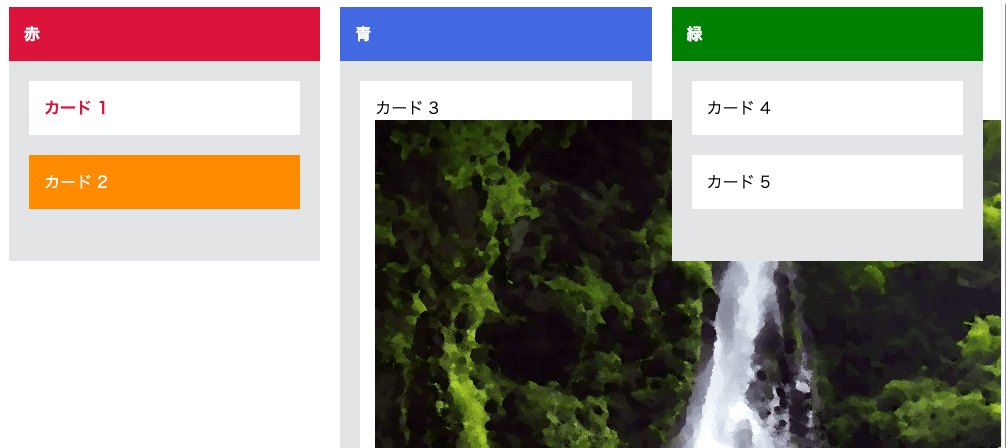
次に、CSS で「画像の幅は .
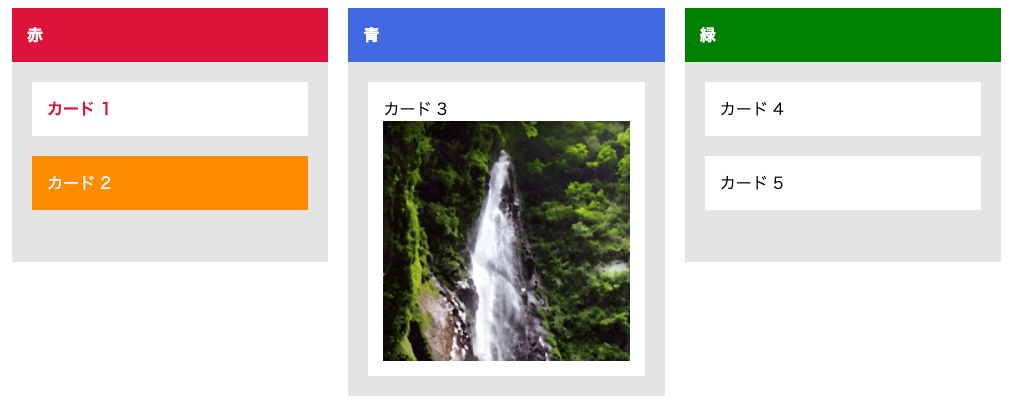
.kanban-item .item-body img {
  width: 100%;
}
.kanban-item .item-body {
  max-height: 240px;
  overflow: hidden;
}
この CSS が適用されると、下図のように画像がイイ感じにカード内に収まるようになります。
カードの背景色を設定する
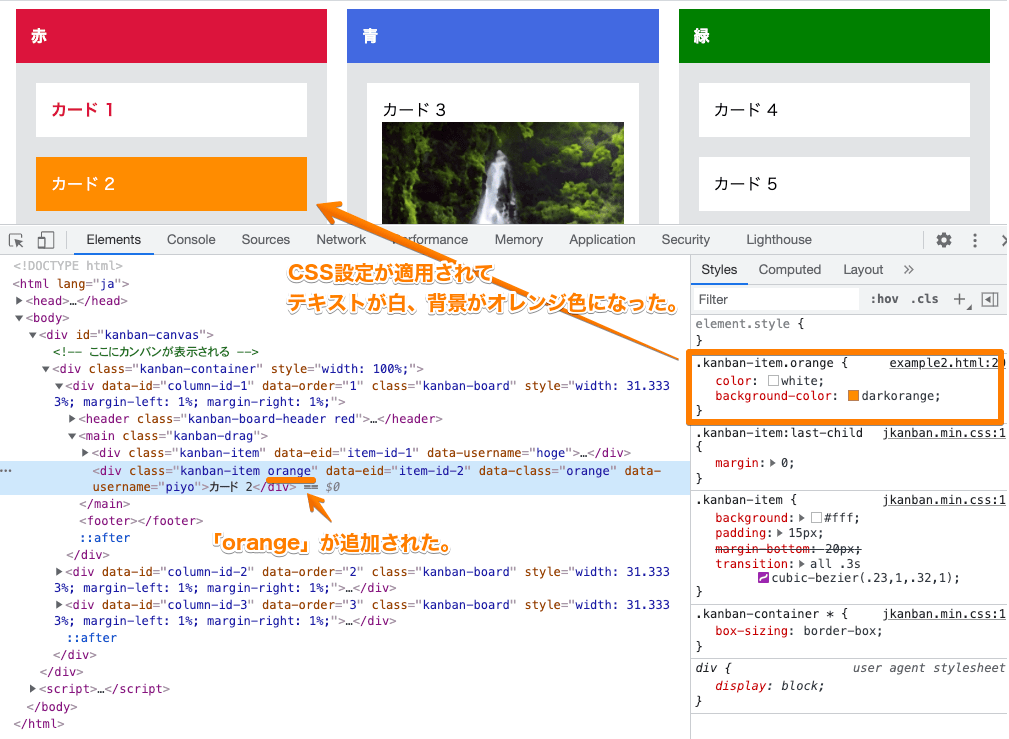
赤いカラムに表示されている「カード 2」は、テキスト色が白、背景がオレンジ色になっています。
「カード 2」は、次のように定義されています。
{
  "id": "item-id-2",
  "title": "カード 2",
  "class": "orange",
  "username": "piyo"
}
ここでも class 属性を使って「このカードの class は『orange』ですよ」という設定を行っていますが、この値はカードの構成要素である <div class="kanban-item"> のクラス名には追加されず、data-color= 属性として追加されます。
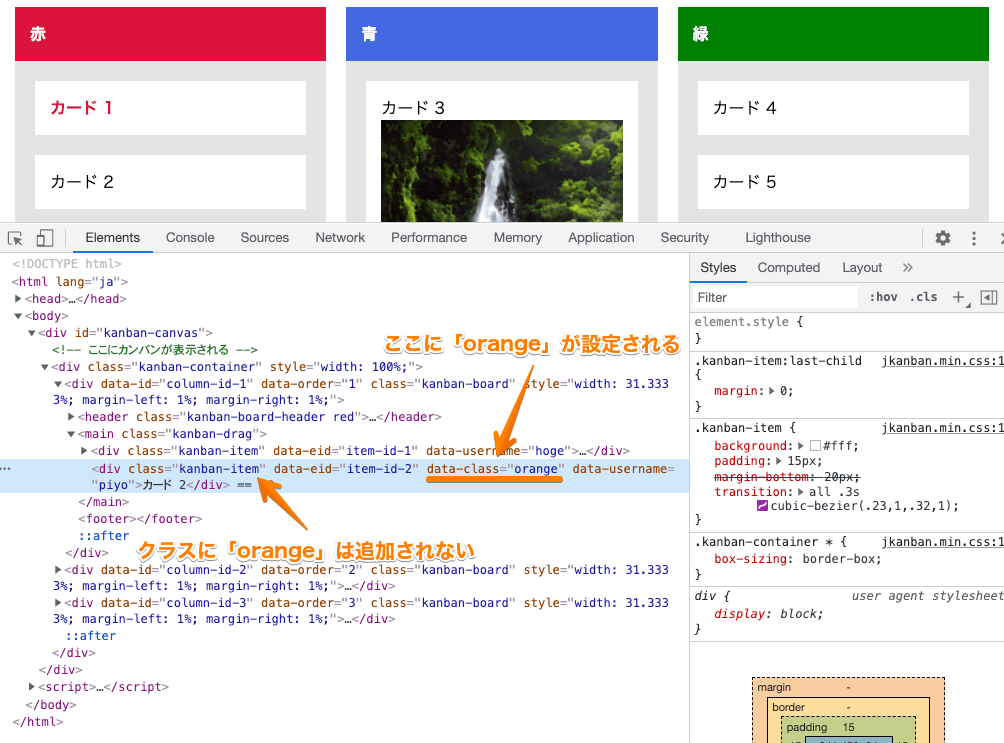
つまり、この↓ように class= 属性に「orange」という値が追加されるのではなく、
<div class="kanban-item orange">...</div>
この↓ように新しい data-class="orange" という属性として追加されます。
<div class="kanban-item" data-class="orange">...</div>
したがって、CSS で「orange というクラスがあったら、背景色をオレンジ色にする」という設定を行っても、(クラス名に『orange』が無いので)カードの背景色はオレンジ色にはなりません。
.kanban-item.orange {
  /* カードには「orange」クラスが無いため、この設定は効きません。 */
  color: white;
  background-color: darkorange;
}
そこで、「カードの data-class= 属性が設定されていたら、その値を class= 属性に追加する」という JavaScript を書きます。
注意: Internet Explorer は NodeList を forEach() メソッドで処理できないため、このコードを実行するとエラーになります。
// カードに data-class= 属性が設定されていたら、
// その値を取得してクラス名に追加する。
document.querySelectorAll('.kanban-item').forEach(item => {
  if (item.dataset.class) {
    item.classList.add(item.dataset.class);
  }
});
この JavaScript が実行されると、下図のように「orange」が class= に追加され、上記の CSS 設定(テキストを白、背景色をオレンジ色)がカードに適用されます。
まとめ
以上、jKanban のカラムやカードを装飾する方法を紹介しました。
これらを応用することで、カードにもっと複雑なコンテンツを表示したり、色やその他の装飾を変化させたり、面白いことが色々とできますね。
次回は、カードがクリックされたりドラッグされたときの処理を見ていく予定です。
 I18N ERROR: @tsiskin#footer_RSS_Feed